

Set up your team
A team takes about a minute: name, sport, age group, level and home city. It gets a public page and a team code right away.
- Right after you sign up, choose I coach a team and you land on Set up your team. Skipped it? Tap Register a team on the Team tab.
- Enter the team name, choose Baseball or Softball, and pick the age group and level (Recreational, Select or High School).
- Add your city and state. The state sets the team’s time zone for reminders; the city shows on its public page.
- Tap Create my team. You are the head coach. Your page link (athlioapp.com/t/your-team) and Team code are on the team’s Settings page.
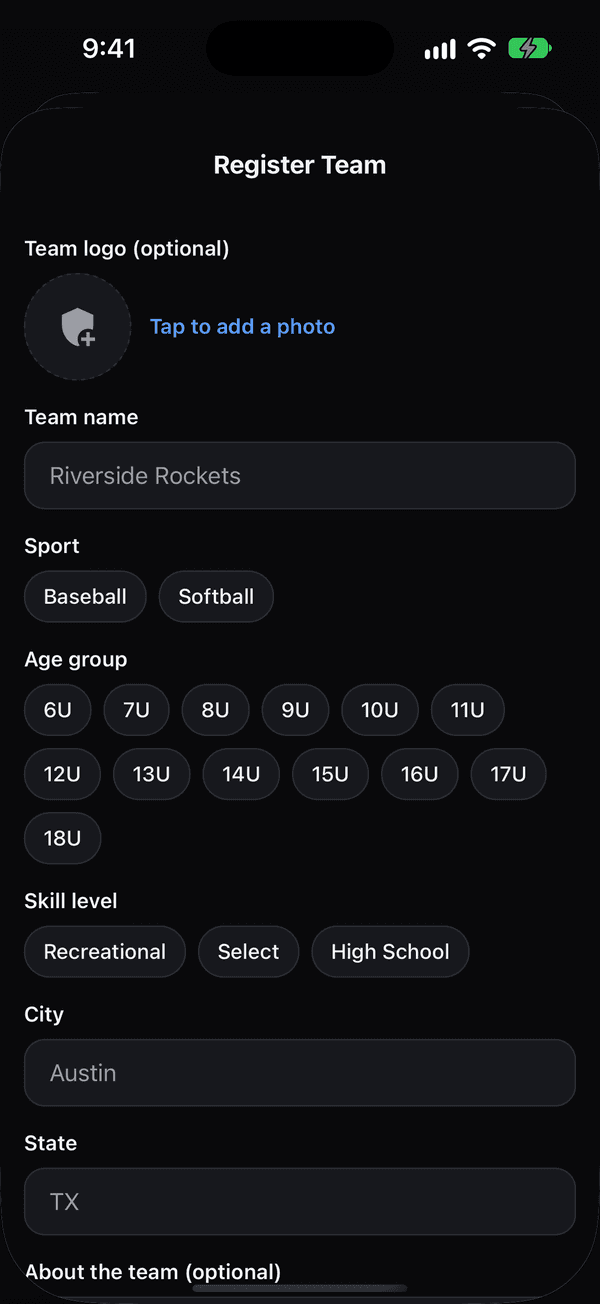
Register a team: the same fields as Set up your team If that didn’t work
If the page link is taken, Athlio adds your age group, then your city, then a short code. Changing the team name later does not change the link; the head coach or a Team Manager can change it from the Page link row, once every 30 days.
Was this helpful?