

Post a tryout and collect sign-ups
A tryout is a public event with a sign-up page. Families sign up on the web with no app or account; you see every sign-up in the app.
- On the Team tab, tap Add Event and choose Tryout.
- Answer the four steps: When?, Where?, Who is it for? (tick the open spots this tryout fills, or Just a look, and the positions shown on the sign-up page), and Tell the families?
- Choose whether to email your followers now or hold it, then tap Post tryout. To change the questions families answer, open the sign-up link’s Settings.
- Share the sign-up link from the tryout’s ⋯ menu. Sign-ups appear under Sign Ups; web sign-ups show the player, parent contact and positions.
- On the Decision Board, decide each player: Offer, Call back or Cut. Call back or Cut several at once from the team’s Sign-ups list; offers go one at a time.
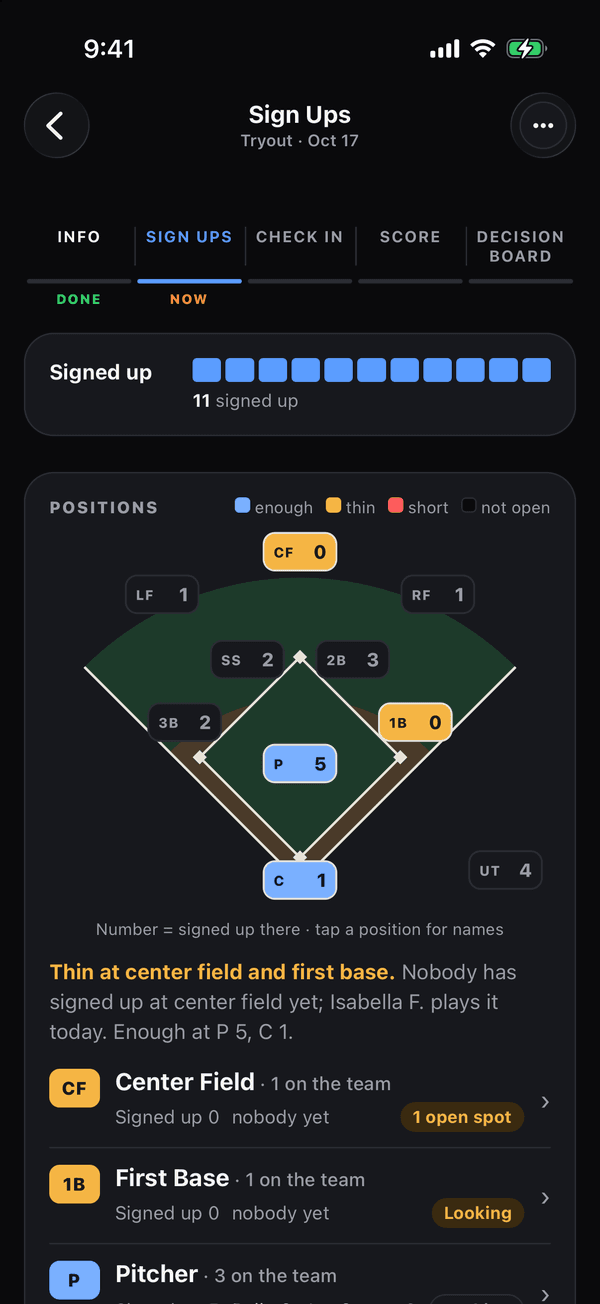
A tryout’s Sign Ups tab, with the five tabs across the top If that didn’t work
Sign-ups not arriving? The sign-up saves the moment a family taps Sign up for the tryout, and a confirmation email follows; ask them to check spam. For a day-of walk-up, use Walk-up check-in.
Was this helpful?