

Plan a practice night
A practice is a timed plan of blocks and stations. Pull drills from the library, set the minutes, and run it from your phone on the field. Practice is free; no Coach Pro needed.
- On the Team tab, open Practice and tap Plan it on a night (or Add Event › Practice).
- Set the practice length. Add blocks with the + chips (Warmup, Hitting, Infield, Outfield, Pitching, Catching, Speed & Agility, Game IQ). The bar shows how the night fills.
- Inside a block, tap + Add a station and search drills and skills, or type your own.
- Tap Save to library… at the bottom to reuse the plan on other nights. Saved plans live under the Practices page’s Library.
- On the night, tap Start. Each block counts down; the walk between stations is added on top of the block time.
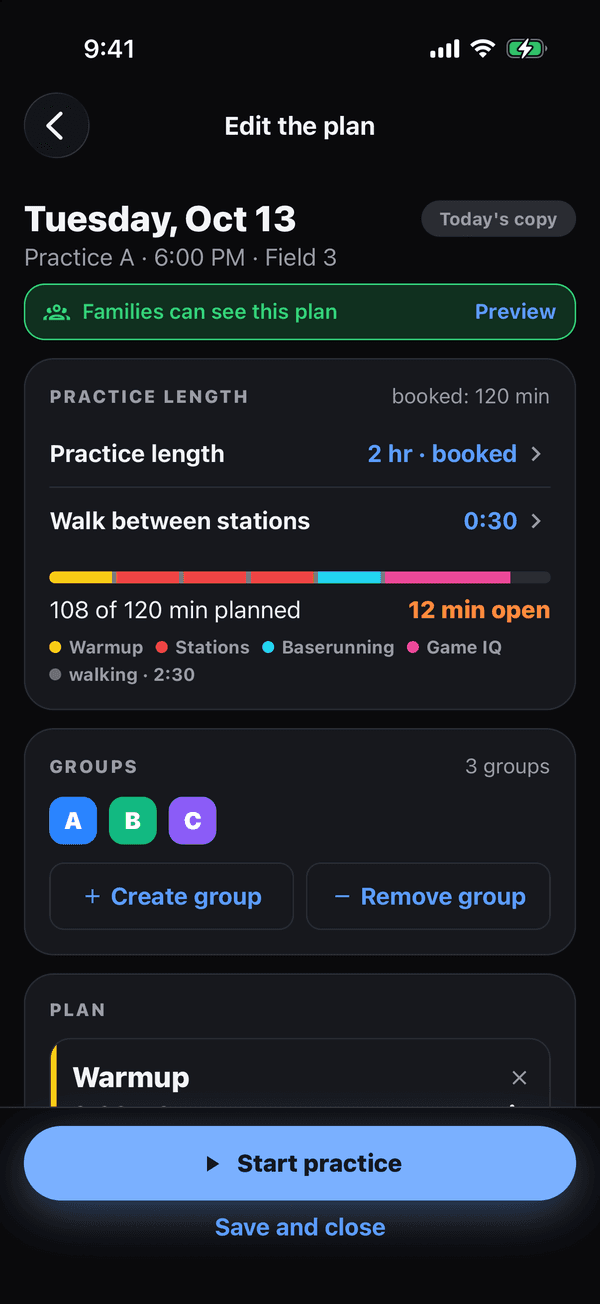
The planner: the length bar fills as you add blocks If that didn’t work
Want families to see the plan? Turn on Share plans on the Practices page; they get the blocks and drill names, never your notes.
Was this helpful?