
Plan practice in minutes.Run it on the clock.
Athlio: Dugout is a practice planning app for youth baseball and softball coaches. Build the night in timed blocks and stations from a library of 350 drills, then run it from your phone on one shared clock, so you coach instead of watching the time.
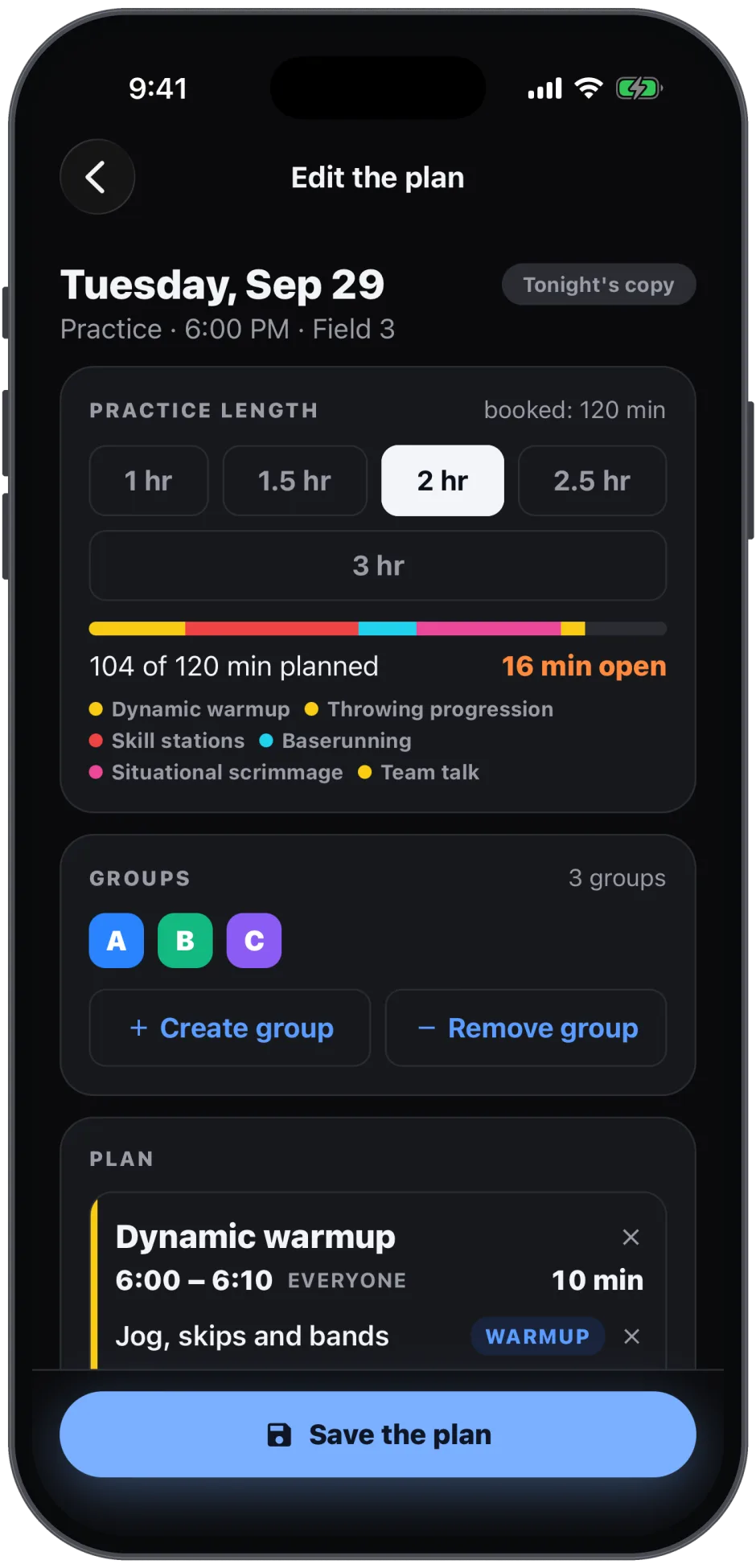
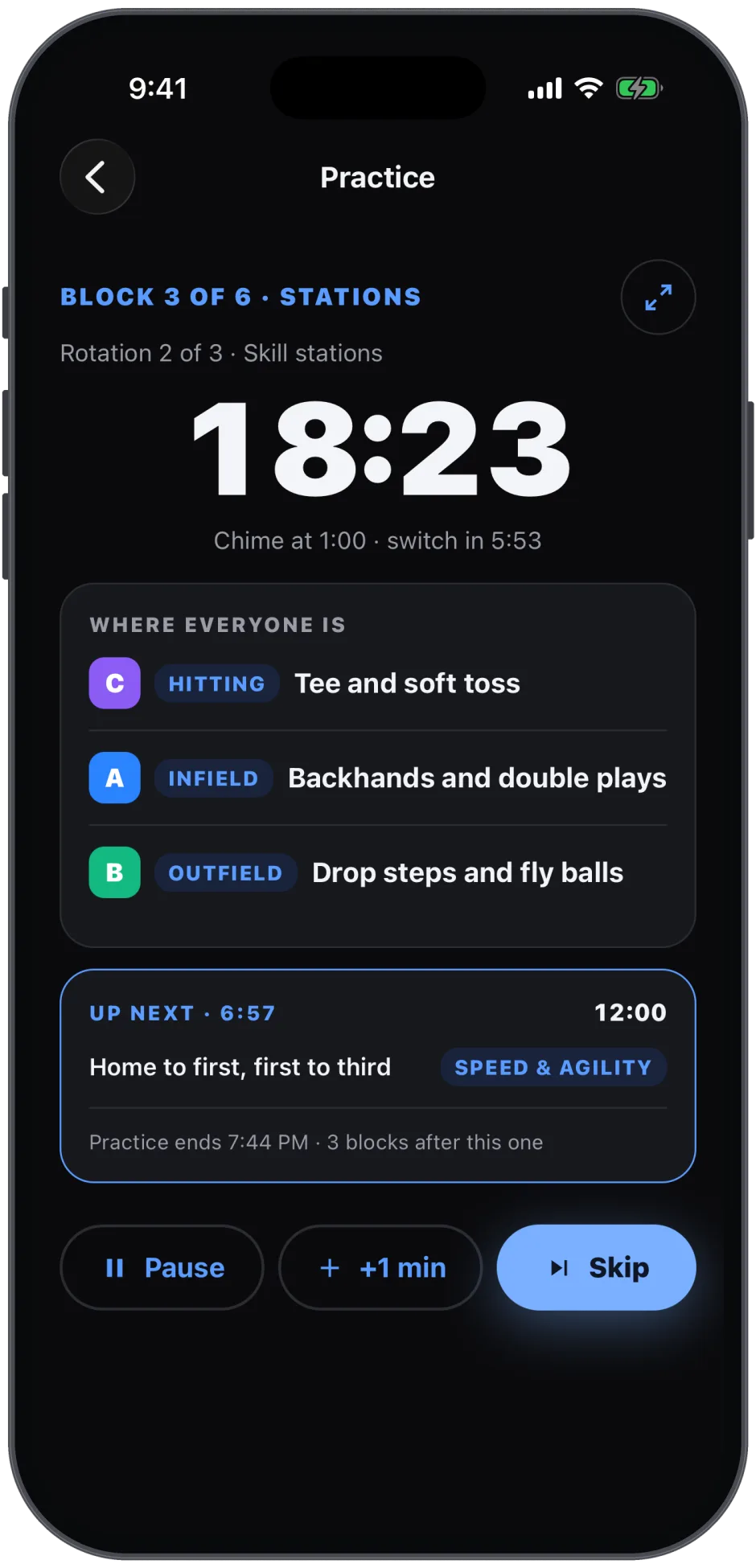
Blocks, stations, groups, clock.
Set the length
Pick the night on the Practices page and tap Plan it. Set how long you have; the bar shows how the night fills as you add blocks.
Add blocks
Warmup, Hitting, Infield, Outfield, Pitching, Catching, Speed & Agility, Game IQ. Each block has its minutes and its groups.
Add stations
Inside a block, search the 350-drill library by drill or by skill, or type your own station. Groups rotate through the stations in the block.
Run it
On the night, tap Start. Each block counts down on one shared clock with a chime before every switch; the walk between stations is booked in on top.
350 drills, tagged by the skill they train.
Every drill in the library carries the skills it trains (the same forty-one skills your tryouts and evaluations score), how many players it takes, the level, the ages it suits and the equipment to bring. Search for a drill by name, or search for a skill and see every drill that works it. Drills carry an overview in plain words; there are no videos or links to leave the app for.
Save a finished night to your library and reuse it: a Tuesday hitting night, a pre-tournament defense night, a rain-shortened hour. Saved plans live under the Practices page’s Library, and a plan can be shared with the team so families see the blocks and drill names.
Plan Tuesday from your last evaluation.
The team’s lowest skills, beside the planPRO
On the web planner, the skills your roster scored lowest in the last evaluation sit next to the blocks, so the night has a reason.
Practice built from the evaluationPRO
Build this week’s practice around the skills your last evaluation says the team needs most, with drills that train exactly those skills.
A clock the whole field can read
Turn the iPad sideways: where every group is and what comes next, with a chime a minute before each switch. Free.
Attendance that counts itself
Check players in at practice; the roster shows 30-day, 90-day and season attendance. Free.
Practice questions coaches ask.
Is the practice planner free?
Yes. Planning a practice, the drill library, saved plans and the clock are free for every coach. Coach Pro adds one thing here: building the week’s practice around the skills your last evaluation says the team needs most.
How long does it take to plan a practice?
A few minutes. Set the length, add blocks with the chips (Warmup, Hitting, Infield, Outfield, Pitching, Catching, Speed & Agility, Game IQ), add a station or two inside each block from the drill library, and the bar shows how the night fills. Save the plan to your library and reuse it on another night.
What is in the drill library?
350 baseball and softball practice drills, each tagged with the skills it trains, how many players it takes, the level, the ages and the equipment. Search by drill or by skill, or type your own station.
How does the clock work on the field?
Tap Start on the night. Each block counts down on one shared clock; groups A, B and C see where they are and what comes next, and a chime sounds a minute before every switch. The walk between stations is added on top of the block time, so the plan runs on time.
Can families see the practice plan?
If you turn on Share plans on the Practices page. Families get the blocks and drill names, never your notes.
Does the planner track attendance?
Yes. Check players in at practice, and the roster shows each player’s attendance for the last 30 days, 90 days and the year, counting check-ins first and RSVPs when there was no check-in.
Before practice, the tryout. After it, the report.
Plan tonight’s practice.
Free to start. iPhone, iPad and Android.